If you’ve searched for SkyCrypt while playing Hypixel SkyBlock, you’re probably looking for an easier way to view your character’s progress. Instead of checking every stat through in-game menus, SkyCrypt presents your profile in a clean, organized dashboard that is simple to browse. It gathers publicly available player data through the Hypixel API, giving you a detailed overview of your account without changing anything in the game.
SkyCrypt has become a popular tool among casual players, competitive guild members, and content creators who want quick access to important profile information. From skills and equipment to inventory, pets, collections, and net worth, everything is displayed in one place to help you understand your progress more clearly.
In this guide, you’ll learn what SkyCrypt is, how it works, its main features, and why so many Hypixel SkyBlock players rely on it every day. You’ll also discover how to use the platform, whether it’s safe, how it compares with similar profile viewers, and what to do if you run into common issues. By the end, you’ll have a clear understanding of how SkyCrypt can make tracking and sharing your SkyBlock profile much easier.
What Is SkyCrypt?
SkyCrypt is a free online profile viewer built for Hypixel SkyBlock players. It allows you to view detailed information about a player’s account in a much cleaner format than the game’s menus. Rather than replacing Minecraft or Hypixel SkyBlock, it simply displays publicly available profile data in an easy-to-read dashboard.
The platform pulls information through the Hypixel API, which provides access to player statistics and progression. Once a username is entered, SkyCrypt organizes details such as skills, equipment, armor, inventory, pets, collections, accessories, net worth, and other account information into separate sections. This makes it much faster to review your progress or check another player’s profile.
SkyCrypt was created by members of the Hypixel SkyBlock community who wanted a simpler way to explore profile data. As the game continued to grow with new updates and features, many players found the in-game interface difficult to navigate for detailed account analysis. SkyCrypt solved that problem by presenting the same data in a more visual and user-friendly layout.
Its popularity has grown because it saves time and helps players make better decisions about upgrades, gear, and progression. Guild leaders also use it when reviewing applicants, while content creators often share SkyCrypt profiles to explain builds or compare accounts during videos and live streams.
It’s important to understand that SkyCrypt is not the game itself. You cannot play Hypixel SkyBlock, collect items, or make changes to your account through the website. It acts only as a profile viewer that reads publicly available data, making it a convenient companion tool for anyone who wants a clearer view of their SkyBlock progress.
How SkyCrypt Works
SkyCrypt turns complex Hypixel SkyBlock profile data into a simple, organized view that is easy to understand. Instead of searching through multiple in-game menus, players can see nearly everything about an account from a single page. The platform retrieves publicly available information, processes it, and presents it in a format that is much easier to read.
Using the Hypixel API
SkyCrypt relies on the Hypixel API to access player information. When you enter a Minecraft username, the platform requests the corresponding profile data from Hypixel’s servers. The API returns details such as skills, experience, armor, inventory, pets, collections, achievements, and other statistics. SkyCrypt then organizes this information without changing or interacting with your game account in any way.
How Player Data Is Displayed
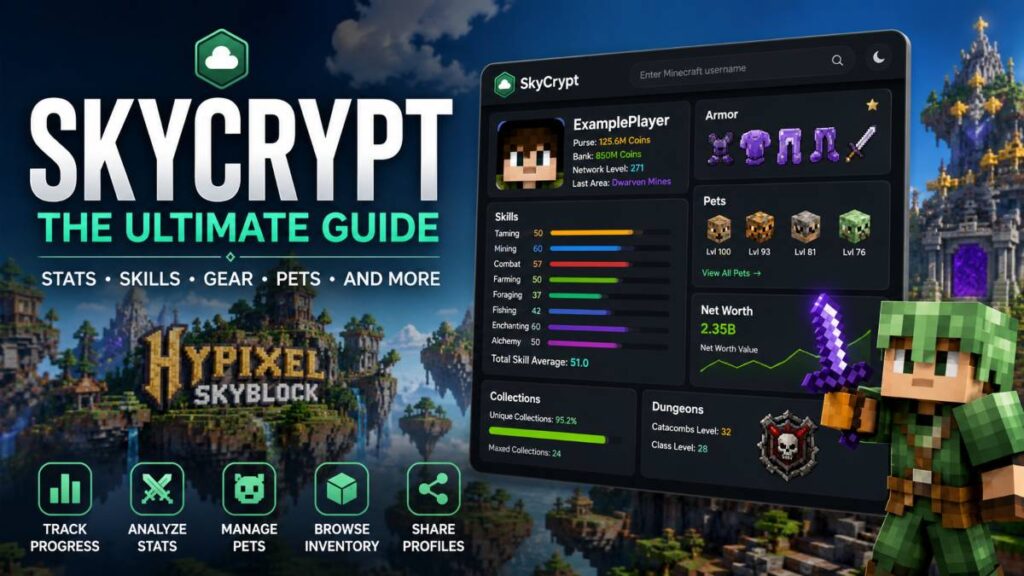
After retrieving the data, SkyCrypt arranges it into clearly labeled sections. Instead of long lists or hidden menus, you can quickly browse your equipment, accessories, pets, storage, profile progress, and estimated net worth. Visual indicators, icons, and progress bars make it easier to understand how far you’ve progressed and where improvements can be made. This layout also makes profile sharing much more useful when comparing accounts with friends or guild members.
Why the Interface Is Easier Than In-Game Menus
The Hypixel SkyBlock interface is designed for gameplay, not detailed profile analysis. Finding specific information often requires opening several menus and switching between different screens. SkyCrypt removes that extra work by gathering everything into one organized dashboard. Whether you’re reviewing your own account or checking another player’s profile, you can locate important information in seconds, making planning upgrades and tracking long-term progress much more convenient.
Main Features of SkyCrypt
SkyCrypt offers much more than a basic profile lookup. It brings together a wide range of Hypixel SkyBlock information in one organized dashboard, making it easier to understand your account and compare it with others. Whether you’re a new player or a veteran, these features help you monitor progress without spending time navigating in-game menus.
View Player Stats
One of the most useful features is the ability to view detailed player statistics. SkyCrypt displays information such as combat performance, slayer progress, dungeon achievements, collections, and other important profile metrics. Everything is grouped into clear sections, allowing you to find the information you need in just a few clicks.
Track Skills and Experience
Improving skills is a major part of Hypixel SkyBlock, and SkyCrypt makes tracking them simple. You can view your levels in mining, farming, combat, fishing, enchanting, foraging, alchemy, taming, and other skills. Progress bars and experience values help you see how close you are to reaching the next level, making it easier to plan your next activities.
Browse Equipment and Inventory
SkyCrypt provides a detailed look at your current gear and inventory. You can inspect armor sets, weapons, accessories, backpacks, storage, and other carried items without opening the game. This is especially useful when reviewing builds, preparing for dungeons, or checking whether certain upgrades are worth pursuing.
View Pets and Collections
Pets play an important role in many SkyBlock activities, and SkyCrypt lists each pet along with its rarity, level, abilities, and experience. It also displays collection progress across different resources, helping you identify which collections are complete and which still need more work.
Check Net Worth
The platform includes an estimated net worth calculation based on your equipment, inventory, storage, and other valuable items. While the value may change as the in-game economy shifts, it provides a helpful snapshot of your account’s overall wealth and progression.
Compare Multiple Profiles
Many players like to compare their accounts with friends, guild members, or top-ranked players. SkyCrypt makes this process straightforward by allowing you to search different usernames and review their profiles side by side. This can help you discover better equipment choices, identify skill gaps, and learn from more experienced players.
Share Profiles with Others
Every profile has its own shareable link, making it easy to send your account to friends, guild officers, or content creators. Instead of taking multiple screenshots, you can simply share your profile page so others can review your stats, equipment, pets, and overall progress. This feature is especially helpful for guild applications, build discussions, and community feedback.
Why Players Use SkyCrypt
Hypixel SkyBlock is packed with content, and keeping track of everything through the game alone can take time. That’s why many players use SkyCrypt as a companion tool. It gives a clear overview of an account, making everyday tasks much easier.
One of the biggest reasons people use SkyCrypt is progress tracking. Instead of checking multiple menus, players can quickly see skill levels, completed collections, dungeon progress, and other milestones. This makes it simple to measure improvement over days or weeks and decide what to focus on next.
SkyCrypt is also widely used for guild applications. Many guilds want to review a player’s profile before sending an invitation. A SkyCrypt profile allows guild leaders to check skills, equipment, pets, and overall progression without asking for numerous screenshots or spending time inspecting players in-game.
Another common use is profile reviews. Friends, experienced players, or community members can look over a profile and suggest better armor, weapons, accessories, or skill priorities. This makes it easier for newer players to avoid costly mistakes and improve their accounts more efficiently.
Players also enjoy comparing profiles with friends. Looking at another player’s skills, gear, or achievements can provide useful ideas for future goals. Friendly comparisons often encourage players to keep progressing and experiment with different builds.
For content creators, SkyCrypt is a convenient way to showcase profiles during videos, live streams, or tutorials. Instead of scrolling through game menus, creators can display a well-organized profile page while explaining strategies, reviewing builds, or discussing account progress.
Finally, many players rely on SkyCrypt when planning upgrades. By reviewing current equipment, skills, collections, and estimated net worth in one place, it’s easier to decide which improvements will have the biggest effect. This helps players spend their coins more wisely and work toward long-term goals with greater confidence.
How to Use SkyCrypt
Getting started with SkyCrypt is quick and doesn’t require any software installation or account registration. If your Hypixel profile is publicly accessible through the Hypixel API, you can view your SkyBlock information in just a few steps.
Open the Website
Start by visiting the official SkyCrypt website in your web browser. You’ll see a search bar on the homepage where you can look up any Hypixel SkyBlock player. The site works on both desktop and mobile devices, making it convenient to check profiles from almost anywhere.
Enter Your Minecraft Username
Type your Minecraft username into the search bar and start the search. SkyCrypt will request your publicly available profile data from the Hypixel API and generate a detailed profile page. If multiple SkyBlock profiles are linked to your account, you can switch between them to view each one separately.
Browse Your Profile
Once your profile loads, you can explore different sections of your account. Review your skills, equipment, armor, inventory, pets, accessories, collections, dungeon progress, slayer levels, and estimated net worth. Everything is organized into easy-to-read categories, allowing you to find important information without searching through multiple in-game menus.
Share Your Profile Link
Every profile page has its own unique web address. Simply copy the URL from your browser and send it to friends, guild leaders, or other players. Sharing your profile is much easier than taking several screenshots, and anyone with the link can review your public SkyBlock information.
Simple Walkthrough
- Visit the official SkyCrypt website.
- Enter your Minecraft username in the search bar.
- Open your SkyBlock profile from the search results.
- Browse your stats, skills, inventory, pets, and equipment.
- Copy your profile URL if you want to share it with friends, guild members, or content creators.
Following these steps lets you check your progress in just a few minutes and makes it much easier to review your account whenever you need it.
Is SkyCrypt Safe?
For most players, SkyCrypt is considered safe because it works as a read-only profile viewer. It displays information that is already available through the Hypixel API, meaning it does not access or change your Minecraft account. Its purpose is simply to organize public profile data into a format that is easier to understand.
One of the biggest reasons players trust SkyCrypt is that it doesn’t require your Minecraft login details. You don’t need to enter your email address, password, or authentication codes to view a profile. Simply searching for a Minecraft username is enough to display publicly available SkyBlock information.
Since SkyCrypt only reads data provided by the Hypixel API, it cannot modify your account. It cannot move items, spend coins, upgrade equipment, or perform actions inside the game. Any changes to your SkyBlock profile must still be made while playing on the Hypixel server.
There are also a few privacy considerations to keep in mind. The information shown depends on what the Hypixel API makes available. If your API access is disabled or certain profile details are restricted, SkyCrypt may not display all information. Likewise, anyone who knows your Minecraft username can view the same public profile data that the API provides.
As with any online tool, it’s a good habit to use the official SkyCrypt website and avoid unofficial copies that ask for login credentials. If a website requests your Minecraft password to view a profile, you should leave the page immediately, as SkyCrypt itself does not require account access.
Can You Host Your Own SkyCrypt Instance?
Yes, you can host your own SkyCrypt instance if you have the necessary development experience. The project is open source, which means its source code is publicly available for anyone who wants to study it, customize it, or run a personal version. This flexibility has made it a popular choice among developers who want more control over how the platform operates.
SkyCrypt is built with Node.js, a JavaScript runtime commonly used for web applications. It also uses MongoDB to store data and Redis for caching, helping the application load profile information more quickly and reduce repeated requests to the Hypixel API. Together, these technologies allow the platform to handle player data efficiently.
Self-hosting can be useful in several situations. Developers may want to test new features, create custom themes, integrate additional tools, or build private dashboards for a community or guild. Running your own instance also provides more flexibility if you want to experiment with the code or contribute improvements to the project.
Before setting up your own installation, you’ll need a server or local development environment that supports Node.js, along with MongoDB and Redis. You’ll also need access to a valid Hypixel API key so the application can retrieve player information. Once everything is configured, you can launch your own version of SkyCrypt and manage it according to your own requirements. For most players, however, using the public version is the simplest and most convenient option.
SkyCrypt vs Other Hypixel Profile Viewers
Several tools allow players to inspect Hypixel SkyBlock accounts, but each one offers a slightly different experience. While they all retrieve information from the Hypixel API, the way they organize and present that data can vary. SkyCrypt remains one of the most popular choices because of its clean layout, detailed profile pages, and open-source development.
Alternative profile viewers such as SkyPrizm and SkyKings also provide useful features for checking player progress. They display many of the same profile details, including skills, equipment, pets, and inventory. Depending on the platform, you may also find extra statistics, different layouts, or unique tracking features. Trying more than one viewer can help you decide which interface fits your preferences.
The table below highlights some of the main differences.
| Feature | SkyCrypt | Other Viewers |
|---|---|---|
| Player Stats | Detailed overview with organized sections | Usually available, though presentation may differ |
| Skills | Displays skill levels, experience, and progression | Available on most major profile viewers |
| Inventory | Shows armor, weapons, accessories, backpacks, and storage | Supported by many alternatives, with varying layouts |
| Pets | Displays pet levels, rarity, abilities, and experience | Commonly available but may include fewer details |
| Profile Sharing | Dedicated shareable profile links | Available on most platforms |
| API Support | Retrieves public data through the Hypixel API | Also relies on the Hypixel API |
| Open Source | Yes, allowing developers to host and customize their own instance | Not every alternative is open source |
If you’re mainly looking for a polished profile viewer with strong community support, SkyCrypt is an excellent choice. If you want to explore different interfaces or additional features, SkyPrizm and SkyKings are worth trying as well. Since each viewer presents information a little differently, many experienced players use more than one tool depending on what they want to check.
Common Problems and Simple Fixes
Although SkyCrypt is reliable for most players, you may occasionally run into issues while viewing a profile. Many of these problems are easy to identify and can often be resolved in just a few minutes.
Profile Not Loading
If a profile doesn’t load, first check that the Minecraft username is spelled correctly. A typing mistake or searching for the wrong account is one of the most common causes. If the username is correct, the player may not have a SkyBlock profile available or the service could be waiting for fresh data from the Hypixel API.
API Disabled
SkyCrypt relies on the Hypixel API to retrieve profile information. If API access is disabled for an account, the website won’t be able to display complete profile details. Enabling API access through the Hypixel server settings usually resolves this issue.
Username Issues
Players who have recently changed their Minecraft username may notice temporary lookup problems. Waiting a short time and searching again often fixes the issue once the updated information has been synchronized across services.
Delayed Updates
Profile information isn’t always refreshed instantly. If you’ve just upgraded equipment, gained experience, or completed a dungeon, the latest changes may take a little while to appear. Refreshing the page later is often all that’s needed.
Missing Inventory
If inventory items or equipment aren’t showing, it may be because certain profile data isn’t currently available through the API or hasn’t been refreshed yet. In most cases, the missing information appears after the next successful update.
Cached Information
To improve loading speed, SkyCrypt temporarily stores previously retrieved data in its cache. Because of this, recent changes may not appear immediately. Waiting a few minutes and refreshing the page usually displays the latest available profile information once the cache has been updated.
Tips for Getting More Value from SkyCrypt
Using SkyCrypt regularly can help you understand your Hypixel SkyBlock account more clearly and make smarter decisions as you progress. A few simple habits can make the tool even more useful over time.
One helpful practice is to monitor your progress every week. Checking your profile on a regular schedule makes it easier to see improvements in skills, collections, dungeon levels, and other important areas. Small gains are easier to notice when you compare your current profile with previous results.
It’s also worth comparing older profiles whenever you’ve made major changes to your account. Looking back at your previous equipment, skill levels, or net worth can show how much you’ve improved and help you set realistic goals for the future.
Before spending coins on expensive items, review your current gear carefully. Comparing your armor, weapons, accessories, and pets can help you decide whether an upgrade will provide meaningful benefits or if your resources would be better spent elsewhere.
Another useful habit is to share your profile with experienced players. Friends, guild members, or community forums can often spot opportunities to improve your build or recommend better equipment based on your current progression.
Finally, consider using SkyCrypt alongside other SkyBlock tools, such as calculators, auction trackers, or crafting guides. Combining information from several trusted resources gives you a broader view of your account and helps you plan upgrades, farming routes, and long-term goals with greater confidence.
Final Thoughts
Whether you’re just beginning your Hypixel SkyBlock journey or have been playing for years, having a clear view of your account can make progression much easier. A profile viewer helps you understand where you’re doing well, which areas still need attention, and how your account changes over time.
Throughout this guide, we’ve covered what the platform is, how it works, its main features, common troubleshooting tips, and the reasons so many players rely on it. We’ve also looked at how developers can host their own version and compared it with other popular profile viewers.
If you enjoy setting goals, improving your skills, collecting better gear, or applying to guilds, SkyCrypt is a valuable companion tool. Its organized dashboard makes it simple to review important account details without searching through multiple in-game menus.
Checking your profile regularly can help you spot progress, plan future upgrades, and make better use of your in-game resources. Whether you’re comparing your account with friends or reviewing your latest achievements, using a profile viewer is one of the easiest ways to stay informed about your Hypixel SkyBlock progress.
Frequently Asked Questions
What is SkyCrypt?
SkyCrypt is a free online profile viewer for Hypixel SkyBlock. It retrieves publicly available player data through the Hypixel API and displays information such as skills, equipment, inventory, pets, collections, and other account statistics in a clear, organized layout.
Is SkyCrypt an official Hypixel tool?
No. SkyCrypt is a community-developed project and is not an official product created or operated by Hypixel. It uses the public Hypixel API to display player information.
Is SkyCrypt safe to use?
Yes. SkyCrypt functions as a read-only profile viewer. It displays publicly available information and does not change your account or interact with gameplay.
Does SkyCrypt require my Minecraft password?
No. You never need to enter your Minecraft email address or password to view a profile. Simply searching for a Minecraft username is enough to access available public profile information.
How does SkyCrypt get player data?
The platform retrieves information from the official Hypixel API. It organizes the returned data into an easy-to-read profile page that includes skills, equipment, pets, collections, and many other statistics.
Can I compare multiple SkyBlock profiles?
Yes. You can search for different Minecraft usernames and compare player progression, equipment, skills, and other account details between profiles.
Why is my SkyCrypt profile not updating?
Updates may take a little time because profile information depends on data provided through the Hypixel API and cached information. Refreshing the page after a short wait usually displays the latest available data.
Can developers self-host SkyCrypt?
Yes. Since the project is open source, developers can install and run their own instance using technologies such as Node.js, MongoDB, Redis, and a valid Hypixel API key.
Is SkyCrypt free?
Yes. The public version of SkyCrypt is free to use for anyone who wants to search and view Hypixel SkyBlock profiles.
What are the best alternatives to SkyCrypt?
Popular alternatives include SkyPrizm and SkyKings, both of which allow players to view Hypixel SkyBlock profiles, player statistics, equipment, pets, and other account information through different interfaces.