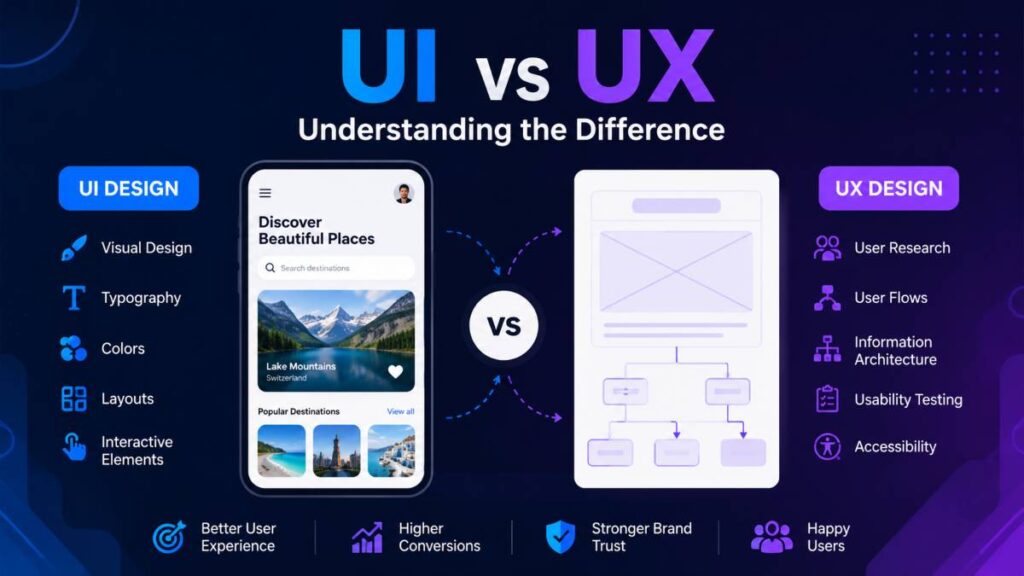
UI vs UX is one of the most searched topics in digital design, yet many people still mix the two together. The confusion makes sense because both work side by side to shape how websites, apps, SaaS platforms, and digital products function. Still, understanding the difference between UI and UX can completely change how you build or improve an online experience.
In simple terms, UI focuses on how a product looks, while UX focuses on how it feels to use. User Interface, or UI, covers the visual side of a product. This includes buttons, typography, colors, layouts, icons, and menus. It is the part users see the moment they open an app or website.
UX, which stands for User Experience, is about the journey behind those visuals. It looks at how easy a product is to use, how quickly users can complete tasks, and whether the experience feels smooth or frustrating. A clean interface may catch attention, but strong UX keeps people engaged.
When discussing UI vs UX, it helps to think of UI as the appearance and UX as the experience. Both matter equally because modern users expect digital products to look polished and work without confusion. Without strong UI and UX working together, even the best ideas can struggle to hold attention.
What Is UI Design?
UI design, short for user interface design, focuses on the visual and interactive side of digital products. It shapes everything users see and touch while using a website, mobile app, SaaS platform, or software interface. From the placement of buttons to the choice of colors, UI design helps create experiences that feel clear, attractive, and easy to navigate.
A strong user interface design does more than make a product look good. It guides users through actions without confusion. Clean layouts, readable typography, balanced spacing, and intuitive navigation all work together to improve interaction. When done well, users barely notice the design because every step feels natural.
Modern UI design also adapts across devices. Whether someone visits a website on a phone, tablet, or desktop, the interface should remain smooth and visually consistent. Popular platforms like Spotify, Airbnb, and Notion are often praised for interfaces that feel polished, modern, and easy to use.
Core Elements of UI Design
Several visual and interactive components shape effective UI design:
- Buttons that clearly guide actions
- Navigation menus that help users move through pages
- Color systems that create mood and brand recognition
- Responsive layouts that adjust to different screen sizes
- Micro interactions such as hover effects, loading animations, or subtle transitions
Typography also plays a major role. Fonts influence readability, tone, and user comfort. Combined with proper spacing and icon usage, these details create a cleaner digital experience.
What Does a UI Designer Do?
A UI designer creates the visual structure users interact with daily. Their work often includes designing mockups, building design systems, and maintaining brand consistency across screens and platforms.
UI designers also focus on visual hierarchy, making sure important content stands out first. They carefully organize elements so users naturally know where to click, scroll, or interact next. The goal is simple: create interfaces that feel visually appealing without slowing users down.
What Is UX Design?
UX design, also known as user experience design, focuses on how a digital product works and how people feel while using it. While UI design handles the visual layer, UX design shapes the full experience behind the screen. The goal is to create products that feel smooth, intuitive, and easy to use from start to finish.
A strong user experience design removes friction. It helps users complete tasks quickly without confusion, frustration, or unnecessary steps. Whether someone is shopping online, booking a service, or using a mobile app, UX design influences how comfortable and satisfying the process feels.
Unlike UI, which centers on appearance, UX design is deeply connected to usability and human behavior. UX designers study how users think, what problems they face, and how digital experiences can become simpler and more natural. This process often involves research, testing, and continuous improvements based on real user feedback.
The emotional side of UX also matters. Users remember how a product made them feel. A confusing checkout page, slow navigation, or cluttered dashboard can push people away within seconds. On the other hand, a smooth experience creates trust and keeps users engaged longer.
Core Elements of UX Design
Several important components shape effective UX design:
- User research to understand audience behavior and pain points
- Wireframes that outline page structure and functionality
- User flows that map how people move through a product
- Information architecture that organizes content logically
- Accessibility practices that make products usable for everyone
Usability testing is another major part of the process. Designers observe how real users interact with a product to identify issues before launch or during updates.
What Does a UX Designer Do?
A UX designer focuses on improving the overall user journey. Their work includes conducting research, testing prototypes, analyzing behavior, and solving usability problems.
They often create journey maps to visualize how users interact with a product at different stages. This helps teams spot friction points and improve navigation, functionality, or content structure.
Problem solving sits at the center of UX design. Every design decision should help users complete actions more easily while creating experiences that feel smooth, useful, and enjoyable across websites, apps, and digital platforms.
UI vs UX: Key Differences Explained
The difference between UI and UX is one of the biggest points of confusion in digital design. Since both work together inside websites, apps, and software products, many people assume they mean the same thing. In reality, UI and UX serve different purposes while supporting the same overall experience.
UI vs UX design can be understood as visuals versus functionality. UI, or user interface design, focuses on the appearance and interaction layer of a product. UX, or user experience design, focuses on the full journey users go through while interacting with that product.
A product may look beautiful on the surface, but if navigation feels confusing or tasks take too long, the experience suffers. On the other hand, a product may work smoothly but still feel outdated or visually unappealing if the interface lacks polish. This is why user interface vs user experience should never be treated as competing ideas. Both are essential parts of successful digital products.
UI vs UX Comparison Table
| Aspect | UI Design | UX Design |
|---|---|---|
| Focus | Visual appearance and interaction | Overall experience and usability |
| Goal | Create attractive and engaging interfaces | Create smooth and user friendly journeys |
| Deliverables | Mockups, style guides, design systems | Wireframes, user flows, research reports |
| Tools | Figma, Sketch, Adobe XD | Figma, Maze, Hotjar, Miro |
| Skills | Typography, spacing, color theory, branding | Research, testing, psychology, problem solving |
| Outcomes | Visually polished products | Functional and satisfying experiences |
The strategic side of UX usually comes before UI. UX designers study user behavior, organize content, and map the structure of a product before visual design begins. UI designers then transform those ideas into polished interfaces users can interact with naturally.
Even though the responsibilities differ, overlap exists between both fields. Many designers understand both disciplines, especially in startups or smaller teams where one person may handle the full product design process. Modern tools like Figma also make collaboration between UI and UX much easier.
Simple Real World Example
A simple way to understand the difference between UI and UX is to think about building a house.
UX design is the architecture of the house. It determines how rooms connect, how people move through the space, and whether the layout feels practical and comfortable.
UI design is the interior design. It handles the colors, furniture, lighting, textures, and visual style people notice first.
A house with beautiful furniture but a terrible layout quickly becomes frustrating. A house with a smart layout but poor visual appeal can feel cold and forgettable. The best experiences happen when structure and appearance work together seamlessly.
The same principle applies to websites, mobile apps, SaaS platforms, and digital products. Strong UI attracts users, while strong UX keeps them engaged and satisfied.
How UI and UX Work Together
UI and UX are closely connected parts of the product design process. While they focus on different areas, both work together to create digital experiences that feel smooth, visually appealing, and easy to use. One shapes the structure and flow, while the other brings that structure to life visually.
In a typical UI UX workflow, UX design usually comes first. UX designers study user behavior, identify problems, and plan how users should move through a product. They focus on creating a logical structure that helps users complete tasks without confusion.
Once the experience and layout are planned, UI designers step in to build the visual layer. They apply colors, typography, buttons, spacing, icons, and interactive details that turn wireframes into polished digital interfaces. This collaboration helps products feel both functional and visually engaging.
UI and UX design also rely heavily on teamwork. Product managers, developers, researchers, marketers, and designers often work closely throughout the project. Developers transform design concepts into working products, while designers continue refining usability and visual consistency during production.
Typical UI UX Workflow
Most digital products follow a structured workflow that combines UX planning with UI execution:
- Research to understand user needs and behavior
- Wireframes to organize structure and navigation
- Prototypes to test interactions and flows
- Visual design to create polished interfaces
- Testing to identify usability issues
- Iteration to improve the product over time
This process helps teams reduce friction and improve the overall user experience before launch.
Why Both Matter for Digital Products
Strong UI and UX can directly influence how users respond to a product. Clean interfaces attract attention, while smooth experiences build trust and encourage users to stay longer.
For businesses, this can improve conversion rates, increase customer retention, and strengthen brand credibility. Users are far more likely to return to products that feel intuitive and visually polished.
A beautiful app with confusing navigation often frustrates users quickly. At the same time, a highly functional product with poor visuals may struggle to build trust. The best digital experiences happen when UI and UX work together from the beginning.
Common Misunderstandings About UI and UX
Even though UI and UX are widely discussed in tech and design spaces, confusion around both fields still exists. Many people use the terms interchangeably without understanding how different their responsibilities actually are. Below are some of the most common UI vs UX myths explained in simple terms.
Are UI and UX the Same?
Myth: UI and UX are identical roles.
Fact: UI and UX work closely together, but they focus on different parts of the product experience. UI design handles the visual and interactive side of a product, while UX design focuses on usability, structure, and user satisfaction.
The UI and UX difference becomes clearer when you think about appearance versus experience. One shapes what users see, while the other shapes how users move through the product.
Is UX Only About Research?
Myth: UX design is limited to surveys and usability testing.
Fact: Research is only one part of UX design. UX designers also create wireframes, user flows, prototypes, and navigation structures. They solve usability problems and improve how digital products function in real world situations.
UX is both strategic and practical. It combines research, psychology, structure, and problem solving to create smoother experiences.
Can One Designer Handle Both?
Myth: UI and UX must always be handled by separate people.
Fact: Many designers work across both disciplines, especially in startups and smaller teams. A single designer may handle research, wireframes, visual design, and testing within the same project.
That said, larger companies often separate UX vs UI roles because each field requires different skills and deeper specialization. Collaboration between both sides usually creates stronger results for complex digital products.
UI vs UX Career Paths and Skills
As digital products continue growing across industries, demand for UI and UX professionals keeps rising. Businesses want websites, apps, and software platforms that not only look polished but also feel simple and intuitive to use. This has created strong career opportunities for both UI designers and UX designers.
Although the two roles often collaborate closely, the skills required for each path are quite different. Understanding the distinction can help beginners choose the direction that fits their strengths and interests.
Skills Needed for UI Designers
UI designers focus heavily on visuals and interaction design. Their work revolves around creating interfaces that feel modern, attractive, and easy to navigate.
Important UI design skills include:
- Visual design principles
- Typography and font pairing
- Color theory and spacing
- Branding and consistency
- Responsive layouts
- Design systems and component libraries
- Familiarity with tools like Figma, Sketch, and Adobe XD
A UI designer also needs a strong eye for detail. Small choices involving button placement, icon styling, or contrast can shape how users interact with a product.
Skills Needed for UX Designers
UX designers focus more on usability, structure, and user behavior. Their role combines research, strategy, testing, and problem solving to improve the overall experience.
Key UX career skills include:
- User research and interviews
- Usability testing
- Psychology and user behavior analysis
- Wireframing and prototyping
- Information structure and navigation planning
- Journey mapping
- Analytical thinking and problem solving
UX designers spend significant time understanding how users think and identifying pain points inside digital products.
UI vs UX Salary and Demand
Both UI and UX careers remain highly sought after across tech, ecommerce, SaaS, finance, healthcare, and media industries. Companies increasingly recognize that user experience directly affects customer satisfaction and business growth.
When comparing UI designer vs UX designer roles, UX positions often lean more toward research and strategy, while UI positions focus more on visual execution and branding. Many companies also hire hybrid UI UX designers who can manage both areas together.
As digital competition grows, businesses continue investing heavily in professionals who can create experiences users actually enjoy using.
Best Tools Used in UI and UX Design
Modern UI and UX design relies heavily on digital tools that help teams plan, design, test, and refine user experiences. From wireframes to usability testing, the right software can speed up collaboration and improve the final product quality.
Today, many platforms combine design, prototyping, and team collaboration in one workspace. This allows designers, developers, and product teams to work together more smoothly throughout the product design process.
Popular UI Design Tools
Several UI UX tools are widely used for creating interfaces, prototypes, and visual systems.
Figma has become one of the most popular choices for modern product teams. It supports real time collaboration, prototyping, design systems, and responsive layouts inside a browser based platform. Many teams now use Figma UI UX workflows from early wireframes to final interface designs.
Sketch remains a strong option for interface design, especially among Mac users. It is known for clean vector editing and flexible plugin support that helps designers customize workflows.
Adobe XD is another widely recognized design tool used for wireframing, interface creation, and interactive prototypes. It integrates well with other Adobe products, making it useful for creative teams already working within the Adobe ecosystem.
These tools help UI designers create polished layouts, consistent branding, and interactive product screens more efficiently.
Popular UX Research and Testing Tools
UX testing tools focus more on user behavior, usability analysis, and feedback collection.
Maze helps teams run usability tests and gather insights from real users quickly. Designers can identify friction points before products go live.
Hotjar provides heatmaps, session recordings, and user feedback tools that reveal how people interact with websites and apps.
Optimal Workshop supports information architecture testing, card sorting, and navigation analysis to improve product structure and usability.
Together, these tools help UX designers understand user behavior and refine experiences based on real interaction data rather than assumptions.
Which Is More Important: UI or UX?
The debate around UI or UX often misses the bigger picture because both play critical roles in creating successful digital products. Asking which one matters more is similar to asking whether appearance or functionality matters more in everyday experiences. The truth is that users expect both.
UI design shapes first impressions. Clean layouts, modern visuals, readable typography, and intuitive buttons immediately influence how users feel about a product. If an app or website looks outdated or cluttered, many users lose interest within seconds.
UX design, however, determines whether people stay. A product may look visually impressive, but confusing navigation, slow workflows, or poor usability can quickly frustrate users. Strong UX creates smoother journeys that help people complete tasks easily and comfortably.
The importance of UI and UX becomes even clearer in modern digital spaces where competition is intense. Users now expect fast, polished, and seamless experiences across websites, mobile apps, SaaS platforms, and ecommerce stores. They want products that not only look professional but also feel effortless to use.
When discussing UI vs UX importance, the strongest products usually combine both disciplines from the beginning. UI attracts attention, while UX builds trust, satisfaction, and long term engagement.
A visually stunning product without usability often fails to keep users engaged. Likewise, a highly functional product with weak visuals may struggle to build credibility. The best experiences happen when UI and UX work together as one connected system.
Final Thoughts
Understanding the difference between UI and UX helps people see digital products from a much broader perspective. UI focuses on the visual side of an experience, while UX focuses on how that experience works and feels for the user. One attracts attention through design, and the other keeps users engaged through usability and structure.
This UI vs UX summary shows that both disciplines depend on each other more than many people realize. A polished interface alone cannot fix a frustrating experience, and a highly functional product can still struggle if the presentation feels outdated or confusing.
For businesses, designers, and product teams, the real goal should be creating experiences that look clean, feel intuitive, and solve user problems smoothly. That is where strong UI and UX design truly stand out.
As digital expectations continue rising, users pay attention to more than visuals. They notice speed, simplicity, accessibility, navigation, and overall ease of use. Keeping both UI and UX aligned from the beginning can help create products people enjoy returning to repeatedly.