If you have ever searched for a VPN, you have probably encountered a wall of technical jargon that made your eyes glaze over. Encryption protocols. AES-256 ciphers. DNS leak protection. Tunneling layers. Kill switches. It all sounds incredibly complicated, and most VPN providers seem to assume you already have a computer science degree before you even sign up.
The good news is that you do not need to understand any of that technical language to use a VPN effectively — but you do need to understand what a VPN actually does, why it matters, and what is really happening when you click that connect button. Because once you grasp the basics, you will make smarter decisions about which VPN to trust, when to use it, and what it can and cannot protect you from.
This article explains VPNs in plain, honest language. No jargon. No assumptions. Just a clear picture of what is actually going on under the hood.
Start With the Problem a VPN Solves
To understand what a VPN does, you first need to understand what happens when you connect to the internet without one.
Every time you open a browser and visit a website, your device sends a request out through your internet connection. That request travels through your Internet Service Provider — your ISP, the company you pay for internet access — before reaching its destination. Along the way, several parties can see what you are doing.
Your ISP can see every website you visit, every search you make, and every app you connect to. In many countries, ISPs are legally required to store this browsing history and can be compelled to share it with government agencies. In some countries, ISPs actively sell this data to advertisers.
The websites you visit can see your IP address — a unique numerical identifier assigned to your internet connection that reveals your approximate location and can be used to track your activity across the web.
Anyone on the same network as you — like other users on a public Wi-Fi connection at a café or airport — can potentially intercept your unencrypted traffic and read it.
This is the problem a VPN is designed to solve. It hides your activity from your ISP, masks your real IP address from the websites you visit, and protects your data from anyone trying to snoop on your network connection.
The Postal Analogy: Understanding VPNs Without the Tech Talk
Here is the simplest way to think about what a VPN does.
Imagine you want to send a letter to a friend, but you are worried that nosy neighbors might intercept it and read the contents. You are also worried that your friend’s address will reveal where you live, because the return address on the envelope is your home.
Now imagine a trusted intermediary — a private postal service with a secure facility. You put your letter inside a locked box and send it to this intermediary. Only the intermediary has the key to open the box. They open it, take out your letter, put it in a new envelope with their address as the return address — not yours — and send it on to your friend.
Your friend receives the letter. It looks like it came from the intermediary, not from you. Your nosy neighbors intercepted the locked box but could not read anything inside it. And even if someone watches your friend receive the letter, they cannot trace it back to your home.
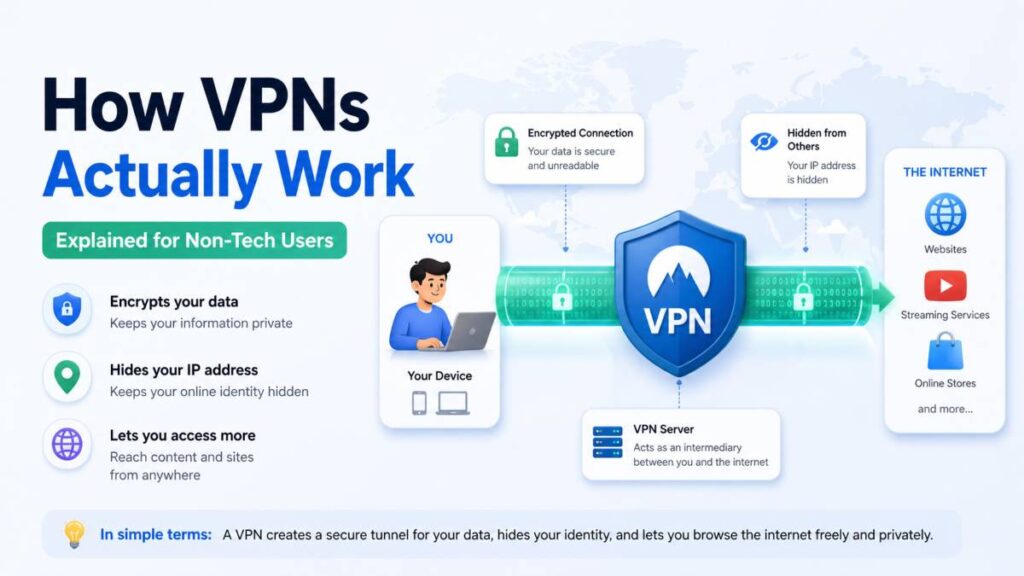
That intermediary is the VPN server. The locked box is encryption. The process of sealing your data, sending it to the VPN server, and having it forwarded to the destination is the VPN tunnel. Your real address — your IP address — is hidden behind the VPN server’s address.
That is fundamentally what a VPN does. Everything else is just technical detail about how that process works. Whether someone uses a mobile app or a Windows VPN setup on their computer, the core idea remains the same: encrypt your connection and route it through a secure intermediary server.
What Encryption Actually Means
You cannot talk about VPNs without talking about encryption, so let us demystify it quickly.
Encryption is the process of scrambling data so that it becomes unreadable to anyone who does not have the key to unscramble it. Think of it like a combination lock on a safe. The data inside the safe is your internet traffic. The combination is the encryption key. Without the right combination, anyone who gets their hands on the safe cannot access what is inside.
When a VPN encrypts your traffic, it takes everything you send and receive — the websites you visit, the messages you type, the videos you stream — and scrambles it into an unreadable jumble before it leaves your device. That scrambled data travels through your ISP’s network. Your ISP can see that you are sending data, but they cannot read what it says. It looks like meaningless noise to anyone intercepting it.
When the scrambled data reaches the VPN server, the server unscrambles it using the shared encryption key, reads the original request, and forwards it to the intended destination — the website or service you were trying to reach. The response comes back to the VPN server, gets scrambled again, travels back through your ISP’s network, and gets unscrambled by the VPN app on your device.
All of this happens in milliseconds, invisibly, every time you do anything online while connected to the VPN.
The Three Things a VPN Actually Does
When you strip away all the marketing language and technical complexity, a VPN does three fundamental things.
It hides your traffic from your ISP and anyone monitoring your network. Because your data is encrypted before it leaves your device, your internet provider cannot see what websites you are visiting or what you are doing online. They can only see that you are connected to a VPN server.
It replaces your real IP address with the VPN server’s IP address. Websites and online services see the VPN server’s location, not yours. This is why VPNs can be used to access content that is restricted to specific countries, and why they are particularly valuable for users looking for the best VPN for Pakistan, where certain content and services may be geo-restricted or blocked.
It protects you on unsecured networks. When you connect to public Wi-Fi — in a café, hotel, airport, or any other public space — your data is potentially visible to others on the same network. A VPN encrypts that data before it leaves your device, making it unreadable even if someone on the same network tries to intercept it.
What Happens Step by Step When You Connect
Let us walk through exactly what happens from the moment you open your VPN app to the moment a webpage loads on your screen.
You open the VPN app on your phone or computer and tap Connect. The app establishes a secure connection to a VPN server — a powerful computer operated by the VPN provider, located somewhere in the world. Think of this server as your private postal intermediary.
Your device and the VPN server perform a handshake — a rapid exchange of information that establishes a shared secret encryption key known only to your device and that specific server. This is how they agree on how to scramble and unscramble your data without anyone else being able to intercept the key.
From this point forward, everything your device sends to the internet first gets encrypted by the VPN app, then travels through what is called a tunnel — a secured, private pathway — to the VPN server.
The VPN server decrypts your traffic, reads the original request, and sends it on to the website or service you are trying to reach. To that website, the request appears to come from the VPN server’s IP address and location, not yours.
The website’s response travels back to the VPN server. The server encrypts it and sends it back through the tunnel to your device. Your VPN app decrypts it, and the webpage loads on your screen.
The entire round trip takes milliseconds. You experience it as a slightly slower connection compared to browsing without a VPN — the extra travel time and encryption processing adds a small delay — but otherwise it feels identical to normal browsing.
What a VPN Cannot Do
This is the part that VPN marketing almost never tells you, and it is just as important as understanding what a VPN does.
A VPN does not make you completely anonymous. It shifts who can see your traffic — from your ISP to your VPN provider — but your VPN provider can potentially see everything your ISP used to see. This is why choosing a trustworthy provider with genuinely verified no-log practices, backed by independent audits and reviewed by organizations like privacyreport.org, matters so much.
A VPN does not protect you from malware or viruses. If you click a malicious link or download infected software, a VPN will not stop the damage. Encryption protects your data in transit — it does not scan for threats or block dangerous content.
A VPN does not make you invisible on websites where you are logged in. If you connect to a VPN and then log into your Google account, Google knows who you are regardless of the VPN. Your account login is a far more precise identifier than your IP address.
A VPN does not protect data that you voluntarily share. If you fill out a form, post on social media, or make a purchase, the recipients of that information have it — VPN or not.
Understanding these limitations is not a reason to avoid using a VPN. It is a reason to use one intelligently, with realistic expectations about what it actually protects.
Choosing a VPN Without Getting Lost in the Technical Details
You do not need to understand the difference between OpenVPN and WireGuard protocols to choose a good VPN. What you do need to look for is straightforward.
Look for a provider that has been independently audited and reviewed by reputable cybersecurity organizations. Websites like privacyreport.org do the technical testing so you do not have to — they evaluate real-world performance, actual logging practices, and security claims against evidence rather than marketing copy.
Look for a provider with a clear, readable privacy policy that specifies in plain language what data it does and does not collect. If the privacy policy is vague, confusing, or buried in legal language designed to obscure rather than inform, treat that as a warning sign.
Avoid free VPNs. As covered extensively by privacy researchers, free VPN services typically monetize user data in ways that directly undermine the privacy protection they claim to offer. For anyone seeking the best VPN for Pakistan or any other privacy-sensitive environment, a reputable paid provider is the only sensible choice.
Look for a provider that offers apps for all your devices — your phone, your laptop, and any other device you use to connect to the internet — because a VPN only protects the devices it is installed and running on.
The Bottom Line
A VPN is not magic, and it is not a complete solution to every online privacy and security concern. But it is a genuinely useful tool when you understand what it actually does.
It hides your browsing from your ISP. It protects your data on public networks. It masks your real location from websites. And when chosen carefully — based on verified no-log practices, transparent ownership, independent audits, and reviews from trusted sources like privacyreport.org — it meaningfully improves your privacy in ways that matter in everyday life.
You do not need to be a tech expert to benefit from a VPN. You just need to understand the basics, ask the right questions, and choose a provider that has earned its reputation through transparency and evidence rather than marketing slogans.
Read Also: How SaaS Security Protects Remote Teams